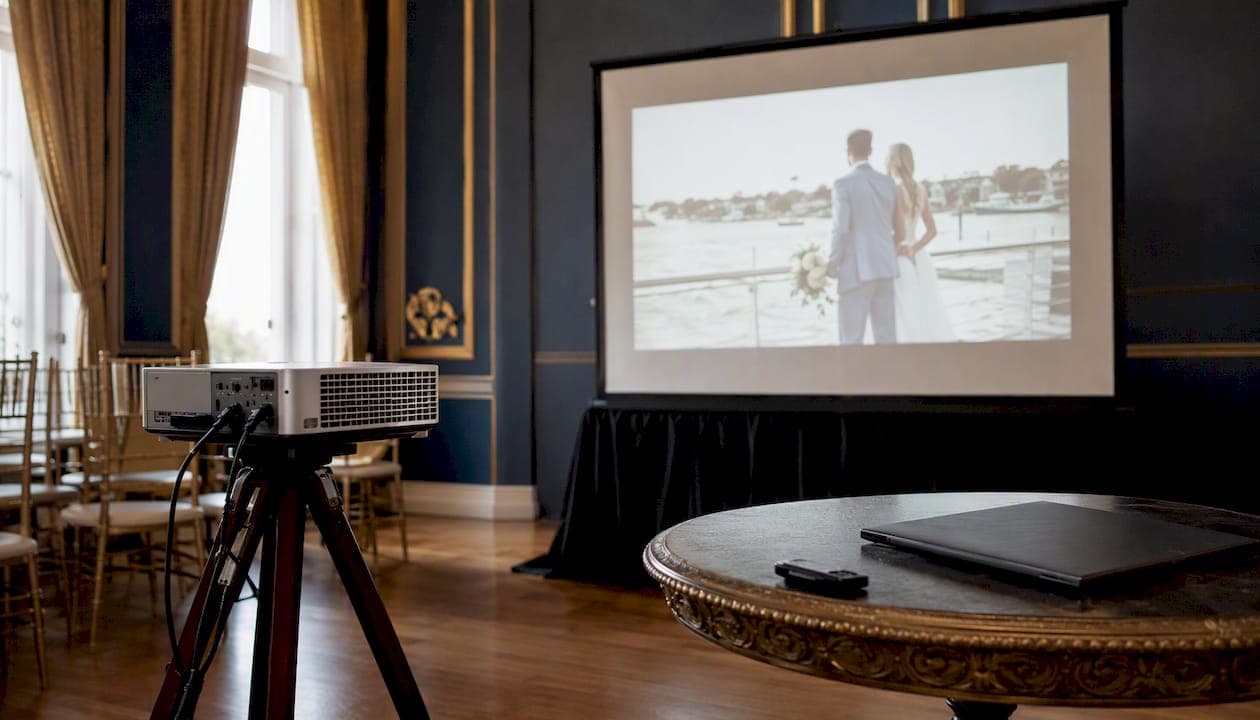
The best wedding slideshow length is 5 to 8 minutes for the reception, up to 15 minutes for a rehearsal dinner, and an open-ended loop of 150 to 200 photos for cocktail hour with no audio. That's the entire calculation, but the details matter more than the range.
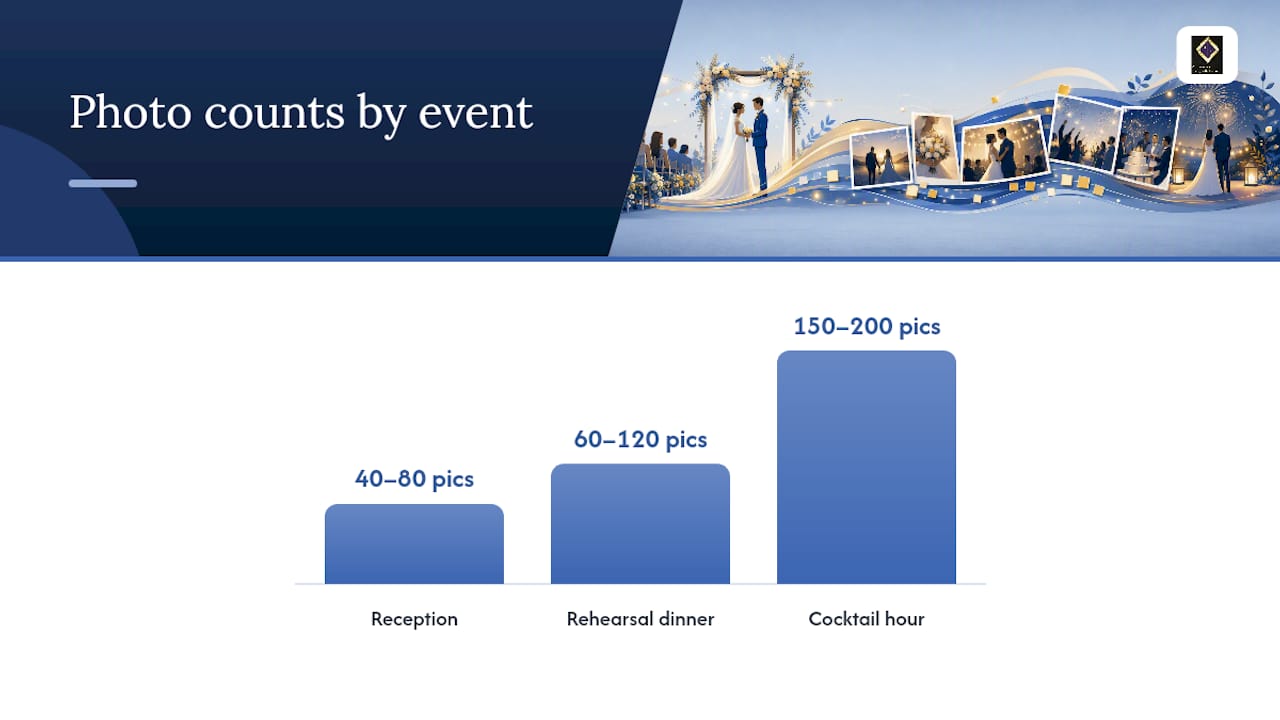
At 5 to 7 seconds per photo, a reception slideshow lands somewhere between 40 and 80 photos. A rehearsal dinner deep dive, since it plays for a smaller, more patient crowd, can stretch closer to 60 to 120 images if you mix in short video clips. Cocktail hour is different math entirely: guests glance at it between conversations, so it's ambient background visuals.
- Reception (feature presentation): 5 to 8 minutes, 40 to 80 photos
- Rehearsal dinner (nostalgic deep dive): up to 15 minutes, 60 to 120 photos or clips
- Cocktail hour (passive loop): no fixed runtime, 150 to 200 photos on rotation
Quick math to remember: at 6 seconds per photo, a 5-minute slideshow needs about 50 photos, and a 7-minute slideshow needs about 70. Round numbers, easy to plan around.
Key Takeaways
The ideal wedding slideshow runs 5 to 8 minutes at the reception, up to 15 minutes at the rehearsal dinner, and loops passively during cocktail hour with no fixed runtime.
| Point | Details |
|---|---|
| Reception stays short | Keep it to 5 to 8 minutes and 40 to 80 photos so it doesn't cut into dinner or dancing time. |
| Rehearsal dinner allows more | A smaller, nostalgic crowd tolerates up to 15 minutes of deeper storytelling. |
| Cocktail hour is passive | Loop 150 to 200 photos with no audio; it's background, not a scheduled program. |
| Pace at 4 to 7 seconds per photo | Faster pacing suits high-energy montages; slower pacing suits sentimental segments. |
| Test playback before the day | Confirm file format, aspect ratio, and backups on the actual venue equipment. |
| Venue AV reduces risk | Ambassador Club Portsmouth's built-in projector and projection wall remove a major setup variable for feature presentations. |
Table of Contents
- How Long Should a Wedding Slideshow Be at Each Event?
- How Do You Decide the Right Length for Your Slideshow?
- How Many Photos Do You Need for a 20-Minute Slideshow?
- How Do You Match Music to Slideshow Pacing?
- What Tech Checklist Prevents Slideshow Failures?
- How Does Venue AV Equipment Change Your Slideshow Plan?
- What Storyboard Templates Work for a Wedding Slideshow?
- What Do Couples Wish They'd Done Differently With Their Slideshow?
- Book a Venue That Already Has the AV Handled
- Sources
- FAQ
How Long Should a Wedding Slideshow Be at Each Event?
Length depends entirely on which moment you're filling, and treating every screening the same way is the single most common planning mistake couples make.
Reception slideshows should run 5 to 8 minutes. That window fits between courses or right before the dancing starts, without eating into time guests want to spend at the bar or on the dance floor. Go longer than 8 minutes at a seated reception and you risk what TheKnot calls guests feeling "trapped" mid dinner service, watching a slow scroll of childhood photos while their entrée goes cold.
Rehearsal dinners can go longer, up to 15 minutes. This is a smaller room, usually just close family and the wedding party, and they're there specifically for sentiment. A deep dive into baby photos, awkward middle school years, and the proposal story lands well here in a way it wouldn't at the reception in front of 150 guests who've never met your college roommate.
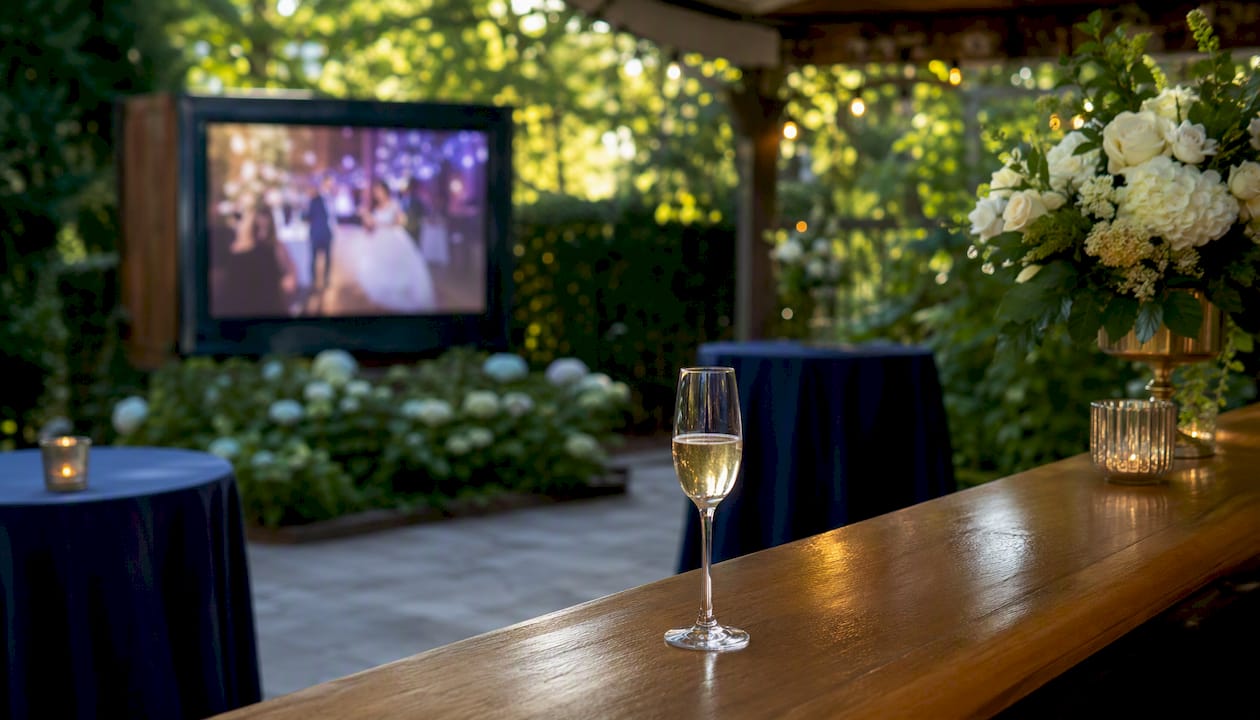
Cocktail hour calls for a completely different format: a silent, looping slideshow of 150 to 200 photos with no set end point, since Tribute's guidance treats this as ambient decoration rather than a scheduled program. No narration, no music track competing with the string quartet or the DJ's ambient playlist, just a rotating visual backdrop guests can glance at while they mingle.
| Event | Recommended Length | Photo Count | Audio |
|---|---|---|---|
| Reception | 5 to 8 minutes | 40 to 80 photos | Music track, synced |
| Rehearsal dinner | Up to 15 minutes | 60 to 120 photos/clips | Music track, optional narration |
| Cocktail hour | Open loop | 150 to 200 photos | None (passive background) |
Some couples split content across both moments. A shorter, tightly edited version plays at the reception with music and full attention, while a longer, unedited photo dump loops quietly during cocktail hour. It's a smart way to use more photos without asking anyone to sit through a 20-minute reel during dinner.
How Do You Decide the Right Length for Your Slideshow?
Four questions settle almost every length decision, and skipping them is how slideshows end up running long, or worse, get cut off mid-song by a DJ trying to keep the night moving.
- Who's actually watching it? A rehearsal dinner crowd of 20 people who've known you for decades tolerates more sentiment than 150 reception guests, half of whom are coworkers or plus-ones.
- When does it play in the schedule? A slideshow squeezed in right before toasts needs to be tight. One playing during a 90-minute dinner service has more breathing room.
- How formal is the rest of the night? A tightly run reception with a strict timeline (first dance at 7:45, cake cutting at 8:15) leaves less room for a slideshow to run over than a relaxed backyard celebration.
- Does the guest list skew older? Older relatives often need slightly longer per photo to register names and faces, which pushes pacing toward 6 to 7 seconds per image instead of 4.
Watch for three red flags that show up in almost every complaint about wedding slideshows:
- The slideshow bleeds into dancing. Nothing kills momentum like guests standing around waiting for a 15-minute reel to finish before the DJ can open the floor.
- Too many slow, static photos in a row. Pacing research suggests attention drops once a single photo holds the screen past 7 seconds, and a string of slow transitions compounds that fatigue fast.
- No backup plan if the tech fails. A slideshow that only exists on one laptop, with no USB copy or cloud link, is one dead battery away from an awkward silence.
Match your pacing to the answers above. A younger, more casual crowd tolerates 4 to 5 seconds per photo and a snappier edit. An older or more formal crowd does better with 6 to 7 seconds and fewer total images.
How Many Photos Do You Need for a 20-Minute Slideshow?
The formula is simple: photos = minutes × (60 ÷ seconds per photo). Plug in your runtime and your pacing choice, and the photo count falls out automatically.
For a 20-minute slideshow at 6 seconds per photo, that's 20 × 10, or 200 photos. That number matters because 20 minutes is far longer than any reception should run. If you're building something that long, it belongs at cocktail hour as a loop, not as a seated, scheduled program. A 200-photo, 20-minute presentation asks guests to sit still and watch for longer than most speeches combined.
Three pacing presets cover almost every wedding style:
A few ready-to-use examples:
- 5-minute slideshow: roughly 45 to 50 photos at 6 to 7 seconds each, paired with one or two songs that together run close to 5 minutes.
- 7-minute slideshow: roughly 65 to 70 photos at balanced pacing, enough room for a Past, Present, Future arc without dragging.
- 10-minute slideshow: roughly 90 to 100 photos, best reserved for a rehearsal dinner rather than the main reception.
If you'd rather skip manual editing, tools like Adobe Express offer templates that auto-calculate timing once you set a target runtime and drop in your photos, which saves guesswork during an already packed planning schedule.
How Do You Match Music to Slideshow Pacing?
Music sets the emotional tempo of a slideshow more than the photos themselves do, and mismatched energy is one of the fastest ways to make a well-edited reel feel off.
Slower sections, like childhood photos or early dating pictures, pair naturally with softer, acoustic tracks. Save upbeat songs for the engagement and wedding-day segments, where the tempo shift signals to guests that the story is building toward the present moment. Switching songs more than once or twice during a short reception slideshow tends to break the narrative instead of enhancing it. Pick one or two tracks that flow together, not four unrelated songs stitched end to end.
- Slow segment (childhood, early years): soft acoustic or piano
- Middle segment (dating, proposal): mid-tempo, warmer instrumentation
- Closing segment (wedding day): upbeat, celebratory
Pro Tip: Play your finished slideshow start to finish with the actual music track before the wedding, out loud, on a real speaker. It's the only way to catch photos that linger too long during a fast verse or cut away too quickly during a slow bridge.
If live music is part of your reception, coordinating slideshow timing with your band or DJ ahead of time avoids the awkward overlap of a swelling chorus fighting with a toast introduction. Guidance on curating wedding music for guest experience makes a similar point: energy flow across the night matters as much as any single song choice.
What Tech Checklist Prevents Slideshow Failures?
Most slideshow disasters aren't about editing, they're about file formats and playback assumptions that nobody tested beforehand.
Export in a widely supported format like MP4, and confirm the aspect ratio matches the venue's screen or projection wall (16:9 for most modern setups). Decide early whether the music track is embedded directly in the video file or played separately by the DJ, since that single choice determines who's responsible for syncing audio to visuals on the night.
| Checklist Item | Why It Matters |
|---|---|
| File format (MP4 recommended) | Widest compatibility across laptops, projectors, and DJ software |
| Aspect ratio check | Prevents stretched or cropped images on the venue's screen |
| Embedded vs. separate audio | Determines who controls sync, you or the DJ |
| USB backup | Works even if a laptop or cloud link fails |
| Cloud link backup | Lets a second person pull up the file from any device |
Bring at least two backups: a USB drive and a cloud link, because laptops crash and Wi-Fi drops at the worst possible moment. Realistically, budget 2 to 4 hours for editing once your photos are gathered, but expect the gathering and sorting itself to take 3 to 4 weeks if you're pulling from family members' phones and old albums.
Before you sign a venue contract, ask directly: Does the space have a built-in projector, or do we need to rent one? Are house speakers available, or does the slideshow need its own sound system? Who operates playback, the DJ, a coordinator, or us? A guide on booking an event hall walks through exactly these AV questions before you commit to a date.
How Does Venue AV Equipment Change Your Slideshow Plan?
A venue with a built-in projector and on-site tech support changes what's realistic to attempt, and it's worth factoring into your venue decision before you start editing.
If the space has its own projector, a large screen, and staff who've run AV before, you have more room to build a full feature presentation, closer to 7 or 8 minutes with a proper narrative arc, because the equipment risk is lower. If you're bringing in a rented projector and setting it up yourself an hour before guests arrive, it's smarter to favor a shorter, simpler slideshow with fewer technical variables.
Ambassador Club Portsmouth's 6,000 square foot hall includes a large projection wall and a built-in projector as part of the venue itself, which removes one of the biggest variables couples deal with: whether the AV equipment will actually work on the day. That kind of setup makes a longer, music-synced reception slideshow far less risky to attempt, since you're not troubleshooting a borrowed projector in the parking lot an hour before guests arrive.
Pro Tip: Whenever possible, put a day-before technical run into your venue contract in writing. A five-minute walkthrough with the actual projector, actual screen, and actual sound system catches problems you'd otherwise discover in front of 150 guests.
- Ask if the projector and screen are included or need separate rental
- Confirm who operates playback on the wedding day
- Request a technical rehearsal slot at least one day before the event
- Check the venue's full amenities list for existing AV capability before renting anything extra
What Storyboard Templates Work for a Wedding Slideshow?
Three storyboard structures cover nearly every wedding slideshow style, and each one maps cleanly onto the runtimes already covered above.
1. Short ceremony-focused reel (5 minutes). Built for a reception slideshow with tight pacing: 1 minute on early life, 2 minutes on the relationship, 2 minutes on the wedding day itself. Roughly 45 to 50 photos at 6 seconds each.
2. Full-relationship mini-doc (10 to 15 minutes). Better suited to a rehearsal dinner, following a Past, Present, Future arc that OurVows recommends for its emotional structure: 1:30 childhood, 2:00 dating and early relationship, 1:30 engagement, remaining time on wedding planning and the big day itself.
3. Cocktail-hour loop (open-ended). No storyline at all, just 150 to 200 photos rotating on a timer with no music track, functioning purely as ambient visual texture while guests mingle.
- Segment 1: Childhood and family (1:30)
- Segment 2: Dating and courtship (2:00)
- Segment 3: Engagement and proposal (1:30)
- Segment 4: Wedding day highlights (remaining runtime)
Adjust these templates based on your guest mix. A wedding heavy with older relatives who've seen the childhood photos before can trim Segment 1 and expand the dating and wedding-day sections instead. If your venue's schedule is tight, cutting straight from Segment 2 to Segment 4 still tells a coherent story in under 5 minutes.
What Do Couples Wish They'd Done Differently With Their Slideshow?
The most common regret isn't about the photos couples chose, it's about length they didn't cut. Almost every couple who runs a 12 or 15-minute reception slideshow says afterward they should have trimmed it to 6 or 7 minutes and let the editing be ruthless rather than sentimental.
The second regret is skipping a full playback test. A slideshow that looks perfect on a laptop screen can display cropped, stretched, or silent on unfamiliar venue equipment, and that's a discovery nobody wants to make live in front of guests. TheKnot's guidance on slideshow etiquette makes the same point: guests remember tight, well-paced, emotionally honest slideshows far more fondly than long, exhaustive ones.
What guests actually remember tends to surprise couples. It's rarely the volume of photos, it's a handful of specific, well-timed images: the first date, a childhood photo next to a wedding-day photo in the same pose, a candid shot nobody expected to see on the big screen. Six or seven perfect photos beat sixty forgettable ones every time.
If there's one thing worth prioritizing above all else, it's guest experience over completeness. Nobody at a wedding wishes the slideshow had been longer.
Book a Venue That Already Has the AV Handled
A lot of couples end up renting a separate projector, screen, and sound system on top of their venue fee, then hoping it all works together on the day. That's an extra vendor, an extra setup window, and an extra thing that can go wrong before your slideshow even starts playing.
Ambassador Club Portsmouth's historic hall in Portsmouth, VA comes with a large projection wall and a built-in projector already in place, which means your slideshow plan doesn't have to start with "first, we need to rent a projector." Combined with flexible catering, a full commercial kitchen, and room for up to 200 guests, it's built for exactly the kind of reception timeline this article has walked through, from where the slideshow fits between courses to how much AV risk you're actually taking on. If a day-before technical run matters to you, ask about it when you book. Check available dates for your reception and get the AV question settled before you're deep into editing.
Sources
These sources shaped the specific runtimes and pacing numbers used throughout this guide.
- How to Make a Wedding Slideshow They'll Watch for Years (2026) | Tribute
- The Ultimate Guide to Creating a Memorable Wedding Photo Slideshow | OurVows Blog | OurVows
- How to Make a Wedding Slideshow Video | Capture
- Dos and don'ts of wedding slideshows | TheKnot
- Crafting Memorable Wedding Slideshows: Tips For A Perfect Ceremony Presentation | ShunBridal
FAQ
What is the 30-5 minute rule for weddings?
This isn't a standardized slideshow rule; it more commonly refers to photography timing guidance, such as allotting roughly 30 minutes for formal portraits and 5 minutes for specific group shots. For slideshow length specifically, stick to the 5 to 8 minute reception guideline instead.
How many pictures do I need for a 20-minute slideshow?
At a balanced pace of 6 seconds per photo, a 20-minute slideshow needs about 200 photos. That runtime works far better as a cocktail-hour loop than as a seated reception presentation, since 20 minutes is longer than most guests will sit still for.
How long is a slideshow with 200 photos?
At 6 seconds per photo, 200 photos runs about 20 minutes, which puts it squarely in passive-loop territory rather than a scheduled reception segment.
Is 2 hours enough time for wedding photos?
Two hours is generally workable for portraits and couple photos on most wedding days, though it depends on your shot list and travel between locations. That timeline is separate from slideshow length, but tight photo schedules often mean fewer fresh photos to add to a same-day slideshow, so many couples build their reception reel from engagement and pre-wedding photos instead.
Does the venue affect how long my slideshow should be?
Yes. A venue with a built-in projector and projection wall, like Ambassador Club Portsmouth, lowers the technical risk of a longer feature presentation, while a venue requiring rented AV equipment favors a shorter, simpler slideshow with fewer variables to manage.